How to Write a Bio for Instagram (Formula, 30+ Ideas, and Free Generator)
A strong Instagram bio fits in 150 characters: who you are, who you help or what you post, one proof point or personal detail, and a clear call to action.
People usually decide whether to follow in a few seconds. If the blank box is the hard part, the free Instagram bio generator will draft a few options and count the characters.
What Makes a Good Bio in Instagram?
A good bio in Instagram helps someone find the account in search, then tells them why to follow.
The rest of the profile header matters too:
| Profile Element | Character Limit | What to Put There |
|---|---|---|
| Name Field | 64 characters | Your name plus your main keyword (e.g., Maya Lin | Brand Designer). Instagram indexes this field for search. |
| Username (@handle) | 30 characters | Something short and easy to spell, with minimal underscores or numbers. |
| Bio Copy | 150 characters | Your core pitch, proof or personality, and a call to action. |
| Category Label | Preset options | Available on Business and Creator accounts. Use it so you don't waste bio space stating your job title. |
| Links Field | Up to 5 links | Clickable URLs to your website, newsletter, shop, or booking page. Change these in the Instagram app. |
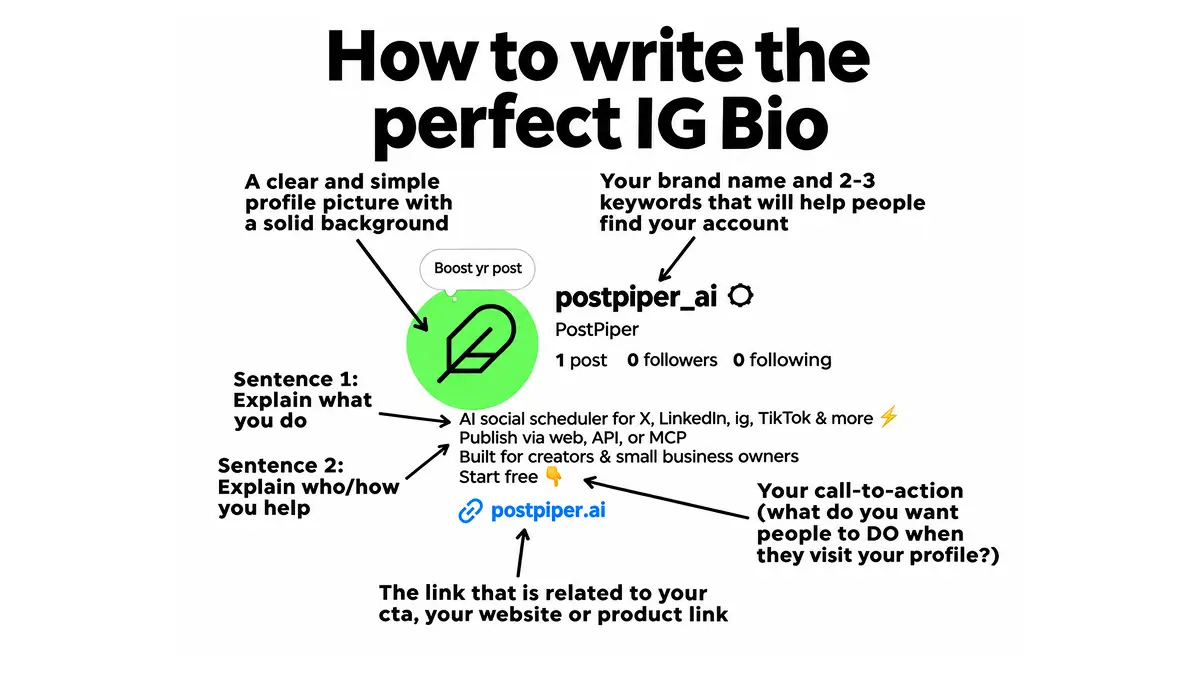
Put the keyword in the name, the pitch in the bio, and the URLs in Links.
Write your IG bio in 4 steps
- Put what you do or share on the first line, so a stranger can tell what the account is.
- Add one proof point or personal line: "Helped 400+ local shops", a credential, or something that sounds like you.
- Break ideas onto separate lines. Two or three emojis are enough. One dense paragraph is hard to scan.
- End with one CTA that says what the tap is for. "Grab the free meal plan 👇" is clearer than "Check out my link".
Quick before-and-after example:
- Weak:
Coffee lover | Entrepreneur | Living my best life ✨ DM for collabs! Link below - Better:
Building small-batch coffee gear ☕/Brewing guides for home baristas/10k+ brewers in our weekly newsletter/Free dial-in chart 👇
The Instagram bio generator drafts a few bios for your niche and tone. Free, no signup.
30+ Instagram Bio Ideas and Copy-Paste Templates
Use these Instagram bio ideas as starting points. Swap out anything in brackets to fit your account.
Instagram Bio Ideas for Small Businesses and Brands
[Product type]made for[target customer]/ Ships worldwide 🌍 / Shop new arrivals 👇- Helping
[city/region][solve specific problem]since[year]/ Book your spot below 📅 - Handmade
[product]crafted in[location]/ Small batches, restocked every[day]/ Order here 👇 - Sustainable
[category]without the markup /[Number]+happy customers ⭐ / Browse the catalog 👇 - Your neighborhood
[coffee shop / bakery / studio]/ Open[days & hours]/ Menu & directions 👇 - We turn
[pain point]into[desired result]/ Free[quote / sample / consultation]below 👇
Instagram Bio Templates for Creators and Founders
- Building
[Product Name]in public / Sharing[topic 1]+[topic 2]every week / Try it free 👇 [Role]writing about[niche]/ Former[previous role or company]/ Join[number]readers 👇- Teaching
[audience]how to[achieve goal]without[common headache]/ Free starter kit 👇 - Daily
[format: recipes / design tips / gear reviews]in under 60 seconds / Links to everything I use 👇 - Founder of
@yourcompany/ Obsessed with[topic]/ Weekly notes on[subject]👇 - Helping
[audience]go from[Point A]to[Point B]/ DM"[KEYWORD]"for my free guide
Short and Minimalist IG Bio Ideas (Personal)
[City]based.[Hobby 1],[hobby 2], and good coffee.- Documenting
[year], one photo at a time. [Profession]by day,[hobby]by weekend.- Currently in
[City]📍 / Next stop:[Destination] - Less noise, more
[thing you love]. - Just here for
[interest 1]and[interest 2].
IG Bio Quotes and Short Quote Bios
Quote bios work when they are short enough to read in one glance:
- "Do small things with great care."
- "Collect moments, not things."
- "Make it simple, but significant."
- "Progress over perfection, every single day."
- "Create what you wish existed."
- "Stay curious. Keep moving."
Funny and Witty Instagram Bio Examples
- Recovering perfectionist. Currently accepting snacks.
- I put the "pro" in procrastinate.
- My hobbies include eating and complaining that I'm getting fat.
- 90% iced coffee, 10% figuring out what to post.
- Professional overthinker. Amateur
[actual hobby]. - Follow me for
[topic]and the occasional unsolicited dog photo.
If none of these sound like you, put your niche and tone into the AI IG bio generator.
How to Edit or Change Your Bio on Instagram
The bio text itself takes under a minute to change, in the app or on desktop. Website links are a separate step, and those only edit in the app.
On the Instagram app (iOS and Android)
- Open Instagram and tap your profile picture in the bottom right corner.
- Tap Edit profile.
- Tap the Bio field and paste or type your new text.
- Tap the checkmark (Android) or Done (iOS) to save your changes.
On desktop (instagram.com)
- Log in to Instagram in your browser and click Profile in the left menu.
- Click Edit profile next to your username.
- Update the text inside the Bio box.
- Scroll down and click Submit.
Instagram drops a blank line when the line above ends in a space. Write the IG bio in Notes, or in the PostPiper generator, delete spaces after punctuation, then paste.
How to Add Clickable Links to Your Instagram Bio (Link in Bio Guide)
A URL typed into the 150-character bio is plain text. Tappable links go in the Links field.
Every account can add up to 5 clickable external links in the profile header. You can only edit those website links in the Instagram app. On instagram.com, the Website link field says: "Editing your links is only available on mobile. Visit the Instagram app and edit your profile to change the websites in your bio."
Step-by-step: adding clickable links in the Instagram app
- Open the Instagram app, go to your profile, and tap Edit profile.
- Tap Links (or Add link), then select Add external link.
- Paste your full URL and add a short Title (such as
Shop New ArrivalsorFree Newsletter). - Tap Done to save. Repeat for up to five links.
The first link shows on the profile. The rest collapse into and 2 others until someone taps them. Drag the URL you want seen to the top.
Two or three destinations, such as a site, YouTube, and a newsletter, fit in those five native links and skip an extra page. Use a separate link-in-bio page when you want click counts, an email signup, or a grid of products.
After the bio is set
A clearer bio only helps people who already opened the profile. PostPiper is where you plan, write, and schedule posts, or send them from an AI workflow through MCP and the API.
Frequently Asked Questions
How do you add clickable links to an Instagram bio?
Editing your links is only available on mobile. Open the Instagram app, go to your profile, tap Edit profile, select Links, and choose Add external link. Paste your URL, give it a short title, and tap Done. Instagram lets you add up to five clickable links, and the first link in your list displays directly under your bio text. On instagram.com, the Website link field tells you to visit the app to change the websites in your bio.
How do I edit or change my bio on Instagram?
Open your profile in the Instagram app and tap Edit profile, then tap Bio to enter or paste your updated text and save. On a computer, go to instagram.com, click Profile followed by Edit profile, update the Bio box, and click Submit.
What is the character limit for an Instagram bio?
An Instagram bio has a hard limit of 150 characters, including spaces, emojis, and line breaks. Your Name field is separate and allows up to 64 characters, which makes it the best place to include your primary keyword or job title.
Should I put hashtags or keywords in my IG bio?
Put your main searchable keywords in your Name field and naturally inside your bio copy. Skip clickable hashtags in your bio unless you are promoting a branded campaign tag, since generic hashtags pull visitors off your profile and onto other accounts' posts.
Is there a free Instagram bio generator I can use without signing up?
Yes. You can use the PostPiper Instagram Bio Generator directly in your browser with no account required. Pick your niche and tone, generate multiple bio options under 150 characters, and copy your favorite straight into Instagram.